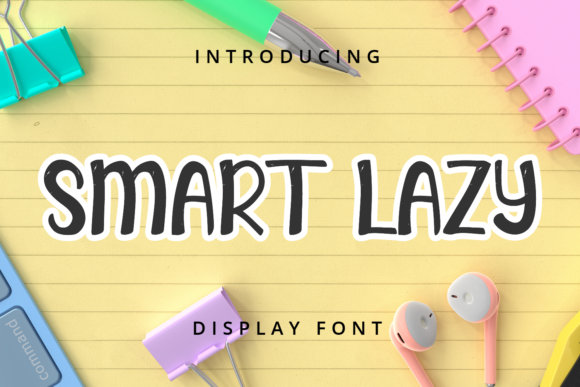
Smart Lazy Font: A Crafter’s Go-To Display Typeface
As a handmade seller who spends hours perfecting product details, I know the difference a font makes. Smart Lazy has become one of my most reliable display fonts for labels, stickers, and printables. It brings a cute, trendy look without sacrificing readability, which is exactly what I need when I am designing products for my shop. Whether I am working on a birthday invitation or a farmhouse sign, this typeface delivers charm that customers notice immediately.
Smart Lazy is a display font with a personality that sits right between playful and polished. It has a friendly, approachable feel that works beautifully on physical products. The letterforms are clean enough to cut on a machine, yet warm enough to make any project feel personal. For crafters like me, that balance is hard to find. Many cute fonts are too ornate for small labels, and many clean fonts feel cold. Smart Lazy sits in that sweet spot where handmade charm meets practical usability.
Why Smart Lazy Works for Handmade Labels and Packaging
Product packaging is often the first thing a customer touches, and the font you choose sets the tone. I have used Smart Lazy on candle labels, bath salt bags, and soap wraps, and it always elevates the look. The font reads clearly at small sizes, which matters when you are printing on a 2-inch label. It also holds up well on kraft paper and glossy sticker paper alike.
For boutique product tags, Smart Lazy gives a modern yet cozy vibe. I like using it for the brand name on hang tags, then pairing it with a simple sans serif for ingredient lists or care instructions. This keeps the tag looking professional without being cluttered. My customers often comment that the packaging looks like it came from a high-end boutique, and that is exactly the impression I want to leave.
Stickers and Decals That Pop
Sticker making is a big part of my business, and Smart Lazy has become a go-to for phrase stickers, motivational quotes, and product labels. When I cut the font on my machine, the curves are smooth and the spacing is consistent. I do not have to spend time adjusting cut lines or worrying about thin strokes breaking apart. For small stickers, the font remains legible even at half an inch tall, which is impressive for a display font.
I have also used Smart Lazy for vinyl decals on mugs and water bottles. The letter shapes transfer cleanly, and the finished product looks crisp. For layered designs, such as a quote with a decorative background, the font holds its own without getting lost. It is versatile enough for both single-color and multicolor applications.
Invitations and Stationery That Feel Personal
When I design birthday invitations, bridal shower cards, or holiday party invites, I want the text to feel warm and inviting. Smart Lazy delivers that personal touch. The font works beautifully for names, dates, and short phrases. I recently used it for a set of wedding invitation envelopes, and the couple loved how the names looked handwritten but perfectly consistent.
For printable wall art, Smart Lazy is a natural fit. It gives quotes a cozy, handmade feel that customers look for in digital downloads. I have sold farmhouse-style prints with phrases like “Gather” and “Welcome” set in this font, and they consistently receive positive feedback. The font also pairs well with floral wreaths and simple line drawings, which are popular in the printable art market.
Planner Pages and Digital Printables
Smart Lazy works well for planner stickers, habit trackers, and weekly headers. Because it is a display font, I use it for titles and decorative elements rather than body text. For example, I might set “Monday” or “Goals” in Smart Lazy, then use a clean sans serif for the task list. This combination keeps the page organized while adding a touch of personality. Customers who buy my digital planners appreciate that the font feels curated, not generic.
How Smart Lazy Affects Product Presentation and Brand Consistency
Using the same font across your product line builds recognition. I have a small home decor shop, and I use Smart Lazy for my logo, product tags, hang tags, and social media graphics. When a customer sees that font, they know it is my brand. That kind of consistency builds trust. It also makes my products look cohesive on a shelf or in an online listing.
The font also affects perceived quality. A well-chosen typeface signals that you care about details. Smart Lazy looks intentional without being fussy. It does not scream for attention, but it does make people look twice. For handmade sellers who want to stand out without losing a professional edge, this font is a solid choice.
Realistic Examples of Smart Lazy in Action
Here are a few projects where Smart Lazy worked particularly well for me:
- Candle labels: The font reads beautifully on small round labels. I pair it with a thin sans serif for scent names.
- Birthday invitations: I set the child’s name in Smart Lazy and used a simple sans serif for the party details. The contrast made the name stand out.
- Farmhouse signs: For wooden signs, I used the font for phrases like “Bless This Home.” The letter shapes are easy to paint or cut.
- Boutique clothing tags: The brand name in Smart Lazy on a kraft tag with twine looks polished and modern.
- Holiday product packaging: I used it for “Merry Christmas” on treat bags. The font felt festive without being overly decorative.
- Printable quote art: Short inspirational quotes set in Smart Lazy sell consistently in my Etsy shop.
Practical Readability Advice for Cutting Machines and Small Prints
If you use a cutting machine like Cricut or Silhouette, you will appreciate how well Smart Lazy weeding goes. The strokes are thick enough that vinyl does not tear, and the letters are spaced in a way that makes alignment easy. For print-and-cut stickers, the font rasterizes cleanly without jagged edges.
For small product labels, I recommend keeping the font size between 10 and 14 points for phrases. For single words or names, you can go smaller, around 8 points, and it will still be readable. If you plan to print on dark materials, a white or light-colored version of the font works well because the letter shapes are distinct enough to hold their form.
Font Pairing Ideas with Smart Lazy
Pairing Smart Lazy with the right companion font makes your designs look intentional. Here are a few combinations I have used successfully:
- Smart Lazy + a clean sans serif: Use Smart Lazy for the headline and a sans serif like Montserrat or Open Sans for body text. This is my go-to for labels and packaging.
- Smart Lazy + a simple serif: For a more classic look, pair Smart Lazy with a serif like Cormorant or Playfair Display. This works well for wedding stationery and formal invitations.
- Smart Lazy + a script font: If you want a romantic or whimsical feel, pair it with a flowing script. Use the script for names and Smart Lazy for the main message. This combination is popular for bridal shower invites.
- Smart Lazy + a handwritten font: For a casual, friendly vibe, pair it with a handwritten style. This works for kids’ party invitations and casual wall art.
What to Check Before You Use Smart Lazy Commercially
Before you start selling products that feature Smart Lazy, take a moment to review the licensing. Many display fonts come with a standard license that covers personal use and small-scale commercial production. If you plan to sell physical products like mugs, shirts, labels, or stickers, make sure the license allows that. For digital products such as printable templates, SVG files, or Canva templates, you may need an extended license that covers resale of the design files themselves.
Also check whether the font includes styles, alternates, ligatures, or swashes. These extras can give your designs a custom look without extra work. Multilingual support is another helpful feature if your audience includes international customers. Smart Lazy is listed as a cute and trendy display font suitable for branding, packaging, invitations, quotes, t-shirts, labels, posters, and logos, so it is clearly built with commercial use in mind. Just double-check the specific license terms for your shop category.
File Formats and Installation Tips
When you download Smart Lazy, you will typically receive OTF and TTF files. OTF files are my preferred choice for design software because they offer better typographic features like ligatures and alternates. TTF files work well for cutting machines and general use. Install the font on your computer, then open your design program. For Cricut Design Space, I recommend using the TTF version for the smoothest performance. For Adobe Illustrator or Photoshop, the OTF version gives you access to advanced features.
If you use the font for SVG designs, test a few letters first to make sure the paths export cleanly. Smart Lazy has held up well in my tests, but every program handles fonts a little differently. A quick test cut or print will save you time later.
Why Smart Lazy Belongs in Your Craft Toolkit
Smart Lazy is more than just a cute font. It is a practical tool that helps handmade sellers create professional-looking products without spending hours on design. It works across mediums, from paper and vinyl to fabric and wood. It pairs well with other fonts, reads clearly at small sizes, and holds up under production conditions. If you are looking for a display font that combines charm with reliability, Smart Lazy deserves a spot in your collection.
Whether you are labeling candles, designing invitations, cutting vinyl for mugs, or selling printable wall art, this font will serve you well. It has earned a permanent place in my design folder, and I suspect it will in yours too.